
Ben Okri Says, “Stories are the secret reservoir of values.” Everyone likes to read and watch stories. Childhood is shaped with the help of stories. Good stories with great values print long positive effect on chindren’s minds.stories with pictures are not forgotten easily. Google Gemini will create stories for you with pictures. You can create an illustrated digital story book with the help of Google Gemini. The feature is available as a Storybook. Everyone with basic knowledge of AI can use the feature. It is easy and quick. This feature of Gemini is useful for teachers, students, parents and content creators as well
Let’s learn how to create our own story. Here are some steps which you have to follow correctly and carefully.
Open Gemini.
- Open your google Gemini app. You can either use a PC or mobile.
- If you are using a PC and Google Chrome Browser you may find it by clicking on nine dots under your profile photo. A mobile app is also available.
- To open on a web type and enter gemini.google.com
- You should be signed to your google account.
Find out ‘Gem’.
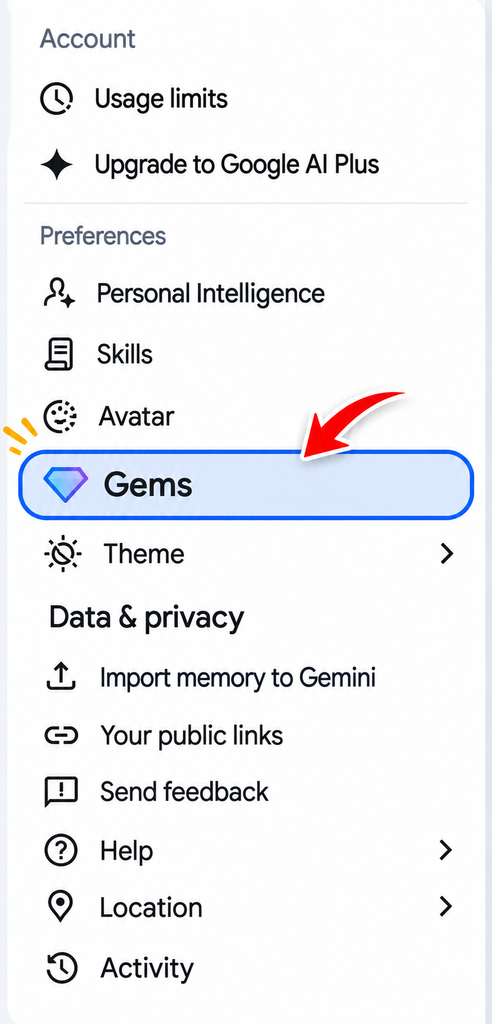
- After opening the google gemini click on the setting button which lays left side on the computer beside the profile photo.
- A new window will be opened. On that window find the Gem manager.
- In Gem manager there are four tabs / options i.e. Storybook, Chesscham, Brainstormer and career guide. Click on the first- Storybook.
Description.
- After opening Gem manager there will be a text box. Click on the text box and describe the theme, characters and plot in it. You may provide the moral of the story as well.
- Provide specific information. e.g. Create a storybook about a seven years old girl who lived a poor life. She was poor but honest. At last the king knew that she was a princess.
- You may request a different visual style. Examples. Cartoon style, watercolour style or pixel art.
- After writing a description click on the arrow, at the right sight of your description.
- After clicking on the arrow three dots will keep moving, that means your request is being processed – the story is being created.
The story is ready.
- Once finished, a preview panel or link will open. When the story is ready the title will appear at the left and storybook right side of the screen.
- Above the image/cover you will find two arrows with left and right direction. These arrows will help you to flip the pages of the book.
- You can read, listen and interact with the story.
- Beside the listen button there are share and download buttons.
Personalization.
- By clicking on the plus icon you can upload photos, images and even pdf also. Your story will be created on the basis of your photos, images or pdf.
- After uploading a photo or image you can request to create a story.
Regeneration of the story.
- If you don’t like any part of the story such as, starting, climax or ending you can request to regenerate the story by typing only “make the ending happy.” or “make the starting impressive.” Your story will be regenerated.
- check your story carefully because ‘Gemini is an AI and AI can make mistakes.’ this is their own declairation.
You can print the storybook or save as pdf also. Colours and the fonts in the storybook are really attractive. Your children or students will enjoy the story.

This is an exceptionally well-articulated discussion on “how to generate storybook on google gemini guide”. Thank you for sharing such a constructive piece—definitely a valuable reference for anyone following this field.